E-04 · Promotional
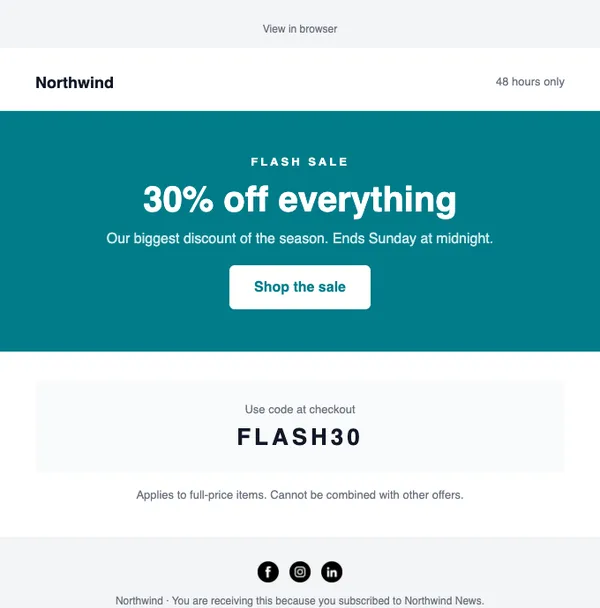
Flash sale
A bold colour banner, a discount code box and one clear button.
- Good for festive and seasonal sales
- Good for 24 or 48-hour offers
- Good for clearance
Free on every planYour brand appliedMobile-ready
How to use it
From template to sent in three steps
STEP 1
Open the catalog
In SendCoop, go to Campaigns → Campaign catalog and pick E-04. Your brand kit is applied.
STEP 2
Fill it in
Add products from your store, edit the text yourself, or give AI a one-line brief.
STEP 3
Check and send
Run the inbox score, send yourself a test, then send or schedule it.
Tips
Getting the most from a promotional email
When to send: For sales, holidays and offers. Give VIPs early access a day before everyone else.
Read about segments and tagsThree tips
- Put the discount and the end date in the first screen.
- Use one button with one clear action.
- Send a short reminder a few hours before the offer ends, only to people who have not bought.
Subject lines to try
- 30% off everything, ends Sunday
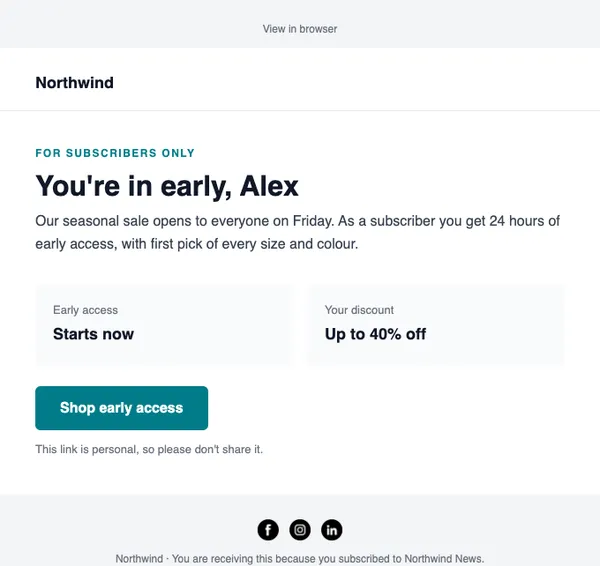
- You’re in early: the sale starts now
- Last few hours for your code
AI can write more in your brand voice.
Keep browsing
All templatesMore email templates
Use this template free
Every design is included on every plan, including the free one.