Abandoned cart emails: timing, examples and subject lines that work
How many reminders to send, when to send them, what to put in each one, and when (not) to offer a discount. With copy you can adapt today.
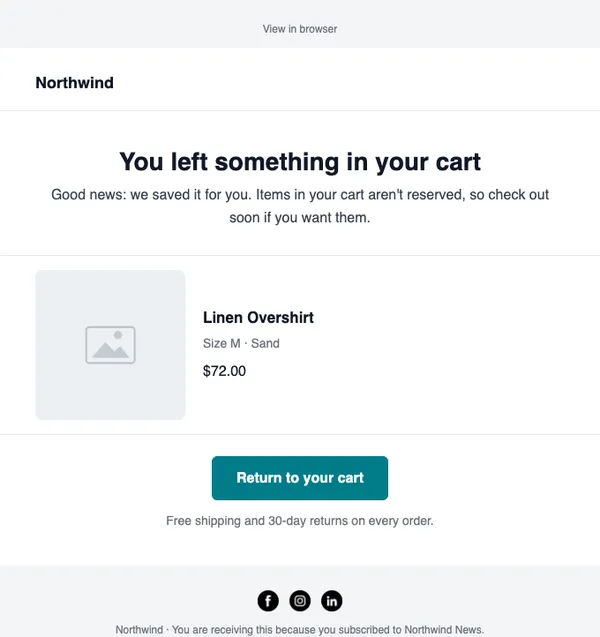
Someone added products to their cart, typed their email at checkout, and left. They were seconds away from buying. An abandoned cart email is the simplest way to bring some of them back, and it is usually the automation that earns the most for an online store.
This guide covers how many reminders to send, when to send them, what goes in each one, and how to set it up.
Why people abandon carts
Before you write anything, remember why people leave. The most common reasons are ordinary:
- They were comparing prices or browsing on a phone and meant to come back later.
- Shipping costs or delivery times appeared late in checkout and put them off.
- They got distracted: a call, a meeting, a child.
- They weren’t sure about size, fit or whether the product was right for them.
- The checkout asked for an account or had a payment problem.
Only some of these are solved by a discount. Most are solved by a timely, helpful reminder.
How many emails, and when
Three emails is a good default. More than that starts to feel pushy.
The first email matters most. Send it while the shopper still remembers what they were buying. In SendCoop, you choose how long a checkout must sit before it counts as abandoned (from 30 minutes to 24 hours), then the automation takes over.
Email 1: the reminder
Keep it short. Show what they left and give them one button back to their cart.
Subject line ideas
- You left something behind
- Still thinking it over?
- Your cart is saved for you
Body
Hi {{ SUBSCRIBER_FIRST_NAME }},
You left a few things in your cart. We’ve saved it for you, so you can pick up where you left off.
{{ SUBSCRIBER_CART_ITEMS }}
Total: {{ SUBSCRIBER_CART_TOTAL }}
[Complete your order] (button linking to
{{ SUBSCRIBER_CART_URL }})
No discount, no pressure. Many shoppers just needed the reminder.
Email 2: answer the doubts
If they didn’t come back after the first email, something is holding them back. Use this email to remove the most likely objection for your store.
Subject line ideas
- Questions about your order?
- Here’s what other customers say
- Free returns, if it isn’t right
What to include
- Two or three short customer reviews of the products in the cart, or of your store.
- Your shipping times and costs, stated plainly.
- Your returns policy, especially for clothing and shoes.
- A reply-to address that a real person reads.
Email 3: the last nudge
This is the place for an incentive, if you use one. It doesn’t have to be a percentage off. Free shipping, a small gift or an extended returns window often work just as well and protect your margin.
Subject line ideas
- Last chance: your cart expires soon
- Free shipping on your order, today only
- One last reminder
If you never want to discount, use this email to recommend alternatives or best-sellers instead.
Should you offer a discount?
Discounts recover more carts, but they have a cost. Shoppers who abandon regularly can learn that leaving a cart gets them a code. A few ways to stay in control:
- Only offer the discount in the last email, never the first.
- Use free shipping instead of money off.
- Use a code that only works once per customer.
- Leave the discount out for low-margin products.
Stop the reminders when they buy
Nothing annoys a customer more than a “you forgot your cart” email after they have paid. Make sure the flow stops as soon as an order comes in.
In SendCoop, the shopper is tagged abandoned-cart when the checkout is abandoned, and the tag is removed (and replaced with customer) when they complete an order. The automation runs on that tag, and with conversion tracking you can set it to stop when the subscriber converts, so buyers leave the flow straight away.
Only email people who agreed to it
Abandoned cart emails are marketing emails in most countries. Send them only to shoppers who are on your list or who ticked the marketing box at checkout. SendCoop only tags shoppers who are subscribed or who gave consent at checkout, which keeps you on the right side of the rules and protects your sender reputation.
Measure what it earns
Track two numbers for the flow:
- Recovered orders: how many shoppers came back and bought.
- Revenue per email sent: what each reminder earns on average.
Compare the three emails. If email 3 barely earns anything, try a different incentive or drop it. If email 1 does most of the work, test sending it sooner.
Set it up in SendCoop
- Connect your Shopify or WooCommerce store, choose the list for store customers and switch on abandoned-cart reminders.
- Create an automation with the Tag based trigger and the tag
abandoned-cart. - Add the first email. The catalog has a ready-made “Left something behind” layout with the cart link, items and total filled in.
- Add a wait and the second and third emails.
- Activate it, then check the store’s recent activity to see carts being picked up.
The step-by-step guide is in the help docs: Send abandoned cart reminders.
Every feature is on every plan, including Free. No card needed.
Start free