Shopify email marketing: 5 automations every store should run
The five email flows that do most of the work for a Shopify store: welcome, abandoned cart, first-order thank you, birthday and win-back. What each one sends and how to set it up.
Campaigns get the attention, but for most online stores the steady revenue comes from automations: emails that go out on their own when a shopper does something. Set them up once and they keep working while you run the store.
These five cover the moments that matter most. Start with the first two; add the rest as you go.
Before you start: connect your store
Automations need to know who your customers are and what they do. Connect Shopify first, choose the list your store customers join, and switch on order tracking and cart reminders. From then on, SendCoop tags shoppers automatically:
customerwhen someone places an order;abandoned-cartwhen a checkout is left unfinished, removed again when they buy.
Those two tags drive most of the flows below.
1. Welcome series
Trigger: someone joins your list (from a pop-up, a sign-up form or checkout).
New subscribers are at their most interested right after they sign up. Send:
- Straight away: the discount or gift you promised on the form, and one line about your store.
- Two or three days later: your story, or the problem your products solve.
- A few days after that: your best-sellers.
Use the Welcome new subscribers trigger. If they buy along the way, the customer tag tells you, and you can stop the sales emails.
2. Abandoned cart
Trigger: the abandoned-cart tag is added.
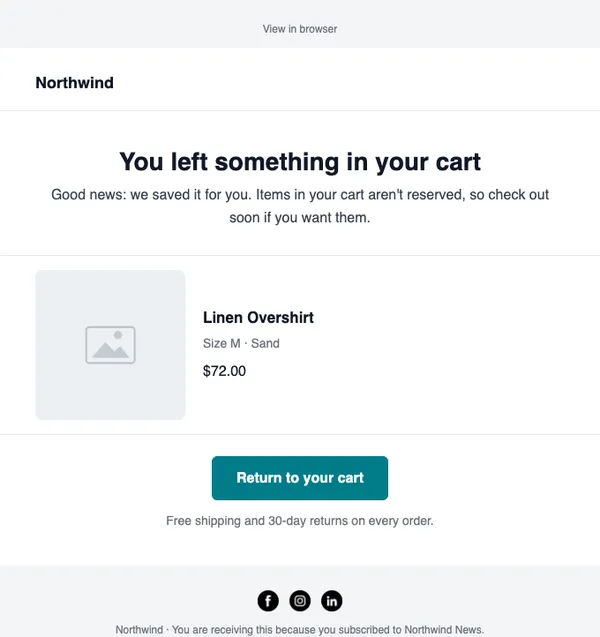
This is usually the flow that earns the most. Send a reminder within a few hours with the cart contents and a button back to checkout, then one or two follow-ups that answer doubts (reviews, shipping, returns). Save any discount for the last email.
Use the Tag based trigger with abandoned-cart. Because the tag is removed when they buy, and you can stop the flow when a sale is recorded, nobody gets “you forgot your cart” after paying.
There’s a full guide with example copy: Abandoned cart emails: timing, examples and subject lines.
3. First-order thank you
Trigger: the customer tag is added (their first order).
Shopify sends the order confirmation. This email is different: it’s a personal thank-you that builds the relationship before the product even arrives.
- Thank them by name and tell them what happens next.
- Share how to get the most out of the product, or a short care guide.
- A week or two later, ask for a review or a photo.
Keep the first email free of selling. People who just paid don’t want another offer yet.
4. Birthday or anniversary
Trigger: a date on the subscriber’s profile.
A small birthday gift is one of the most welcome emails a store can send. Ask for the birthday (day and month is enough) on your sign-up form, store it in a date field, and use the Happy birthday trigger to send a few days before.
No birthday data? Use the Subscriber added date trigger instead and celebrate the anniversary of when they joined.
5. Win-back
Who: customers who used to open and click but have gone quiet.
Build a segment of contacts with the customer tag whose last click was more than 90 days ago. Send them a short “we miss you” email with what’s new, then a final offer. If they still don’t respond, stop emailing them: inactive contacts drag down your deliverability.
You can send this as a campaign to the segment every month, or run it as an automation. See Re-engagement emails: win back inactive subscribers for the full approach.
Measure what each flow earns
With your store connected, SendCoop records the orders that come from each email. Check each automation’s revenue every few weeks:
- Which flow earns the most per email sent?
- Which email in a flow does most of the work?
- Is any email losing people (high unsubscribes) without earning?
Small changes, such as sending the first cart reminder sooner or changing a subject line, often make a bigger difference than adding new flows.
Set it up in SendCoop
- Connect Shopify and choose your store settings.
- Create each automation under Automations → New Automation with the trigger above.
- Start from the ready-made store layouts in the template catalog, or describe the flow to the AI flow builder and edit the draft.
- Activate them one at a time and watch the results.
Every automation is available on every SendCoop plan, including Free.
Every feature is on every plan, including Free. No card needed.
Start free